

Effective restaurant labor management is essential for controlling costs and maximizing productivity in today’s competitive food service industry. Balancing staff schedules, reducing overtime, and maintaining high service standards can be challenging, but mastering these elements directly impacts your bottom line. In this article, we’ll explore seven proven strategies that help restaurant owners and managers optimize their workforce, reduce labor expenses, and improve operational efficiency. Whether you’re running a small café or a large dining establishment, these practical tips will empower you to manage your team smarter and boost profitability.
Labor management is a critical part of running a successful restaurant business. Strong restaurant labor management systems keep a restaurant staffed with the right amount of employees with the right type of skills scheduled at the right times.
When restaurant employees are properly managed, they are motivated to perform better. Labor management helps in reducing work-related frustrations and increasing overall performance.
So, how can you improve restaurant labor management?
It’s through the use of restaurant labor management software.
Key Benefits of Restaurant Labor Management Software for Your Business
Labor management is a critical part of running a successful restaurant business. However, too many managers in the restaurant industry rely on a combination of bulletin boards, sticky notes, and spreadsheets to manage shifts — when there is a better way.
Restaurant labor management software has made it easier for restaurant owners and managers to streamline their labor tasks.
Restaurant labor software provides several benefits to a restaurant while overcoming the weaknesses of manual scheduling with paper or spreadsheets. The major benefits include:
- Improved Communication: Software provides real-time scheduling in which managers and workers can stay up-to-date with the schedule even when someone doesn’t show up. With some software providing email or text notification, communication is enhanced and no gap is left at any given point.
- Increased Automation: Labor management software offers automation through reusable templates that can be used to create schedules instantly. Shift swapping and reminders are also automated, eliminating this burden from management.
- More Accurate Scheduling: Restaurant labor software automates the scheduling process, including factors like worker availability, certifications, and preferences. No need for management to keep repeating the same tasks over and over again.
- Remotely Track Attendance: Management software can be accessed easily on mobile devices. This allows restaurant managers and owners to remotely track their employees and the time they spend at work.
- Controlled Labor Costs: Labor management software with an integrated payroll system allows you to accurately compensate your employees for the hours worked, calculate restaurant labor cost percentage, and save labor cost wastage.
Technology can improve employee productivity, communication, and training. It can help eliminate mundane and repetitive tasks, which can cause burnout. And, it can help you identify ways to reduce restaurant overhead as you can see if you are over-scheduling your staff and paying for labor you don’t need.
So, what types of restaurant labor management software can help you reap these benefits?
Exploring Different Types of Restaurant Labor Management Software
Restaurant labor management software can refer to a variety of tools that support the management of staff. While some labor management software performs multiple management tasks, there are other types of software that work for specific elements of labor management.
Restaurant labor management software is most frequently used for:
- Creating and managing schedules
- Tracking payroll
- Employee communications
- Labor law compliance
Let’s look at how different types of restaurant labor management software and tools can help you effectively manage your restaurant workforce.
How Restaurant Management Software (POS Systems) Enhances Labor Management
Restaurant management software is a system designed to run your entire restaurant operations. The system includes tools for managing labor and is typically built around a point-of-sale (POS) system. A modern restaurant POS system will have most of the restaurant management software you need.
The software can create and manage schedules, track payroll, check restaurant’s compliance to labor law, and enhance employee communication. The software may also help in managing overtime data, time cards, server’s sales data, restaurant labor cost and hours, shifts management, and labor scheduling. All these features are integrated in one place to streamline the entire process.
Restaurant management software improves the efficiency and usage of the labor force. It comes with advanced features that streamline the management of staff. Some of the vital features include attendance and time tracking, payroll report generation, validation of employee clock-ins and -outs, and management of new hires, terminations, and transfers.
If a restaurant POS doesn’t have all the labor management features you need, you may be able to add integrations or use an API to incorporate other software. Lavu’s restaurant POS is built with an open API so you can use a variety of POS integrations to add any additional restaurant labor software you may need.
Employee Management
Running a successful restaurant business involves managing a large workforce. You will usually need to manage separate shifts, especially during peak days. Restaurant owners and managers may find the management of employees overwhelming, especially when several shifts are involved in a day. You want to ensure that each employee is accounted for and that shifts occur seamlessly.
Employee management software is beneficial to a restaurant in several ways. It helps in managing every aspect of the workforce from shift scheduling and pay slips to employee benefits. You no longer have to use old-fashioned Excel or paper-based employee spreadsheets. Employee management software is designed to ease the struggle of managing the restaurant workforce. Restaurant owners and their managers can easily schedule employee shifts and keep everyone involved.
Among the effective employee management software available is the restaurant tip pool software. When the software is integrated via Omnivore, it automates almost the entire tip pooling process. This eliminates the risk of human errors and slashes the time spent by managers on the tip pool by 95%.
Optimizing Restaurant Scheduling for Better Labor Management
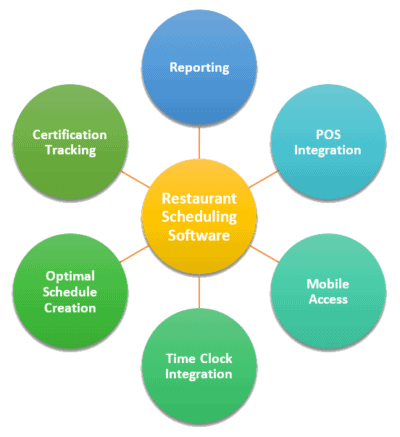
Restaurant scheduling software includes tools used to manage work schedules for servers, chefs, cooks, and other restaurant employees. The software automates the process by helping to track the availability of the employees and those who have requested time off. It helps in overcoming human-related errors related to manually creating employees’ schedules.
Errors can cause confusion among managers or reduce the morale of the employees. On the contrary, a properly implemented restaurant scheduling software brings some important functionalities to labor management.
- Mobile Access: Users of the software can view and modify schedules on their mobile devices depending on their availability.
- Time Clock Integration: Software keeps track of both clock-in and clock-outs through an online web portal or a wall clock. This information can be shared with the finance department for accurate calculations of labor costs and salary payments.
- Optimal Schedule Creation: Software tracks all important factors, including employee availability, business requirements, and leave details. This helps in avoiding any conflicts and ensures schedules and shifts transition efficiently.
- Certification Tracking: Software shows which workers are certified to do certain things in the restaurant and their availability.
- Reporting: Software allows automatic generation of reports based on factors like hours worked, labor budget, sick leaves or paid time-offs, sales and more.
Using Digital Employee Timesheets to Streamline Restaurant Labor Management
Employee timesheets are helpful tools for managing employee shifts. They track the time employees clock in and out of the restaurant and allow them to manage shifts on their own. The timesheets may come as a complete software or an app for restaurant scheduling software, such as 7shifts.
Digital timesheets support employees’ communication, auto scheduling, shift swapping, and efficient team management. For instance, an employee may request a coworker to cover for them and indicate so in the software. Such minor changes are automated allowing employees to swap their schedules without having to wait for the manager’s approval.
Employee timesheets may take the form of time-card apps that track the time an employee spends on a job or tasks. However, this information is automatically shared over the internet to allow managers to keep track of the progress of employees. It eliminates the need to keep guessing whether a certain employee is at work since the information is always available remotely, regardless of the manager’s location.
When you better track employee timesheets, you may even find opportunities to cut costs. You may find that you don’t need as many employees as you originally thought and expose opportunities to reduce labor costs through technology such as self-ordering kiosks.
Choosing the Right Software to Improve Your Restaurant Labor Management
Restaurant labor management software plays a critical role in ensuring proper management of employees. It automates the process, allowing restaurant owners and managers to keep track of their employees at all times. It also allows employees to contribute by choosing their shifts and how they can swap with others depending on availability.
If you are looking to implement restaurant labor management software at your business, let’s talk.
Lavu’s restaurant POS can provide all the labor software features you need to manage your team and run your business. Download our Restaurant POS Buyer’s Guide to learn more. Or, get started today by scheduling your free demo to see our software in action.

FAQs:
1. What is restaurant labor management and why is it important?
Restaurant labor management involves planning, scheduling, and controlling your workforce to maximize efficiency and reduce costs. Effective labor management ensures you have the right staff at the right time, preventing overstaffing or understaffing, which can hurt profitability. Using solutions like Lavu’s labor management software helps automate these processes, providing real-time data to optimize scheduling and improve overall operations.
2. How can I control labor costs in my restaurant?
Labor cost control in restaurants is critical for profitability. You can control costs by accurately forecasting demand, scheduling staff based on peak hours, and minimizing overtime. Leveraging Lavu’s POS system with integrated labor management features allows you to track labor expenses and sales simultaneously, making it easier to balance costs and productivity.
3. How can restaurant labor management software improve my operations?
Restaurant labor management software automates scheduling, tracks employee hours, and analyzes labor costs. Lavu’s software integrates these functions with POS data, offering actionable insights to help you make smarter staffing decisions, reduce errors, and improve compliance with labor laws.
4. What challenges do restaurants face in labor management?
Common restaurant labor management challenges include unpredictable customer flow, high turnover, and compliance with labor laws. Tools like Lavu’s labor management software help address these by offering flexible scheduling, performance tracking, and ensuring accurate payroll processing.
5. How can Lavu help improve my restaurant’s labor management?
Lavu offers an all-in-one POS and labor management solution that simplifies scheduling, tracks employee hours, and integrates labor data with sales. This comprehensive approach helps restaurants optimize staff deployment, reduce labor costs, and enhance operational efficiency.
